
Structure Content with Books
As your collection of documents in Notebooks grows, quick and reliable access becomes increasingly important. While search is always available, a clear structure makes it easier to browse, understand, and manage your content over time.
This is where Books come into play.
Books
Books are Notebooks’ core concept for organizing documents by topic or project.
A Book is a folder that can:
- contain documents of any supported type
- include other Books
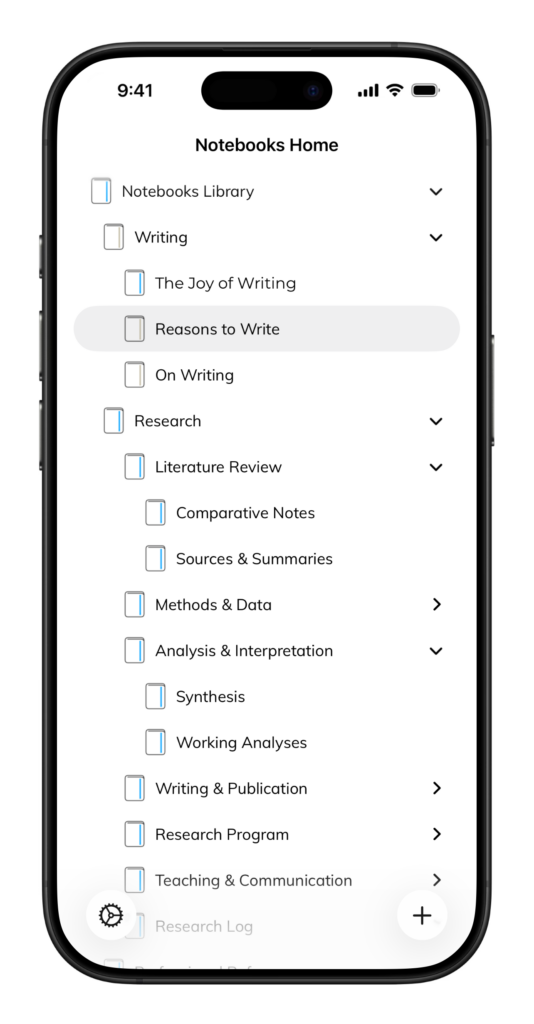
- be nested to reflect the structure of your work
You can think of Books as containers with intent: they don’t just store documents, they define context. A Book might represent a project, a client, a research topic, or a personal journal.
Documents and Books remain distinct, but they work together closely: Books provide structure, documents carry the content.
Organizing Your Work
Books allow you to build a hierarchy that matches how you think.
Common approaches include:
- one Book per project or client
- Books for areas of life or work (e.g. Ideas, Reference, Archive)
- sub-Books for phases, years, or related topics
There is no required structure. You can start simple and refine it as your collection grows.
Nesting and Clarity
Books can contain other Books, making it easy to break down larger collections into manageable parts.
Sub-Books are useful to:
- separate active work from reference material
- organize long-running projects
- keep related documents grouped without clutter
A shallow hierarchy is often sufficient, but deeper structures are available when needed.
Books Evolve with Your Content
Books are not static.
As your work changes, you can:
- rename Books
- move documents between Books
- split large Books into smaller ones
- merge Books that no longer need to be separate
This flexibility lets your structure evolve naturally instead of forcing you to reorganize everything upfront.
Beyond Static Folders
Books provide a clear, stable structure for your content. In addition to that, Notebooks offers more flexible ways to organize and access documents.
At the top level, Notebooks can show Smart Books — dynamic collections that gather documents automatically based on specific criteria. Smart Books are read-only views and do not affect the underlying folder structure.
You can also use Context Tags to add an additional layer of organization. Tags let you assign one or more contexts to a document, such as a topic, status, or area of responsibility. Unlike Books, tags are not hierarchical and can cut across multiple Books.
Together, Books, Smart Books, and Context Tags allow you to combine a stable folder structure with more flexible, cross-cutting views — without duplicating documents or losing clarity.
Consistent Across Devices
Books behave the same way across all platforms supported by Notebooks. Your structure stays intact, no matter where you work.